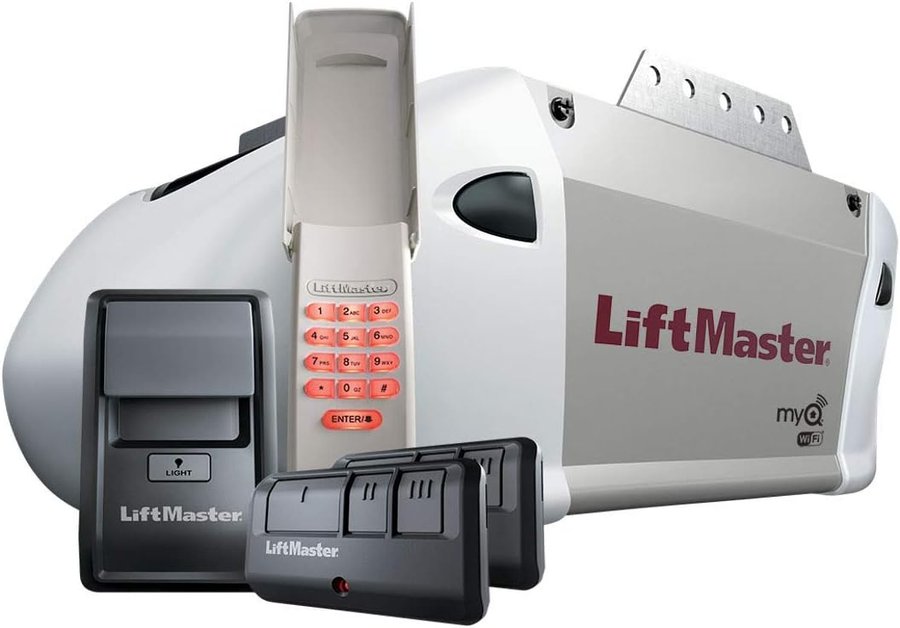
LiftMaster 8365W-267 retail bundle — opener, wall control, 2 remotes, wireless keypad
Premium Series Chain Drive Wi-Fi · Includes 2 remotes & keypad
View on Amazon →8365W vs 8365W-267 — What's the Difference?
The opener itself is identical. The -267 suffix designates the retail bundle version — typically sold at Costco, Home Depot, or Amazon — which includes extra accessories in the box (two remotes, a wireless keypad, and sometimes a wall control). The motor unit, rail, chain drive, Wi-Fi capability, and all features are exactly the same between both models.
If you're comparing parts, blink codes, or troubleshooting steps, treat them as the same opener.
Specs at a Glance
| Spec | 8365W / 8365W-267 |
|---|---|
| Drive type | Chain drive — louder than belt, more affordable, very durable |
| Series | Premium Series |
| Motor warranty | Lifetime |
| Parts warranty | 1 year (vs 5 years on the 8550W belt drive) |
| Wi-Fi | 2.4 GHz (802.11b/g/n) — myQ app — does NOT support 5 GHz |
| Security | Security+ 2.0 rolling code — ONLY compatible with Security+ 2.0 accessories |
| Learn button color | Yellow |
| Backup battery | ❌ None — not available on this model |
| Remote battery | CR2032 (3V coin cell) |
| Door type | Sectional doors only — one-piece doors restricted for auto-close features |
| Door control | 882LMW (standard) or 886LMW (motion-sensing) |
| -267 bundle includes | Opener + 893LM remote × 2 + 877LM keypad + door control + hardware |
myQ Wi-Fi Setup — Step by Step
The 8365W connects to 2.4 GHz Wi-Fi only. Before starting, confirm your phone is connected to your 2.4 GHz network (not 5 GHz), and have your Wi-Fi password ready.
- On the 882LMW or 886LMW door control, lift the push bar and press and release the LEARN button. The Command LED blinks — you have 20 minutes.
- On your phone, go to Settings → Wi-Fi and connect to the network with the "MyQ-" prefix.
- Open a browser and go to setup.myqdevice.com. Follow the prompts and enter your home Wi-Fi password when asked. The myQ serial number displays on screen — write it down.
- Download the myQ app (iOS or Android). Create an account and add your opener using that serial number.
| Wi-Fi LED on Opener | Meaning |
|---|---|
| Blue · Off | Wi-Fi not turned on |
| Blue · Blinking | In Wi-Fi learn mode — ready to connect |
| Blue · Solid | Mobile device connected to opener |
| Blue + Green · Blinking | Attempting to connect to router |
| Green · Blinking | Attempting to reach internet server |
| Green · Solid | Wi-Fi connected and working normally |
If connection fails: try an alternate browser, or visit WiFiHelp.LiftMaster.com. To clear Wi-Fi settings and start over: press and hold the Adjustment button on the back of the opener until 3 beeps are heard (about 6 seconds).
Programming the 8365W Remote
Two methods work — through the door control or directly from the opener's Learn button. Both require Security+ 2.0 compatible remotes only.
Method 1 — Through the Door Control (882LMW / 886LMW)
- Press the LEARN button on the door control to enter programming mode.
- Press the LEARN button again — the LED flashes once.
- Press the button on the remote you want to program. Done.
Method 2 — From the Opener's Learn Button
- Press and release the yellow LEARN button on the back/side of the motor unit. The LED glows for 30 seconds.
- Within 30 seconds, press and hold the button on your remote until the opener lights blink or you hear two clicks.
- Test the remote.
Erase All Remotes
Press and hold the LEARN button for ~6 seconds until the LED goes out. All remotes and keyless entries erased. To also erase myQ devices: hold LEARN until LED goes out, then immediately hold LEARN again until LED goes out a second time.
Compatible Accessories — Security+ 2.0 Only
The 8365W is ONLY compatible with Security+ 2.0 accessories. Older LiftMaster remotes (purple or red Learn button era) will not work.
$30–$45
$30–$45
$6–$10
Troubleshooting Guide
Door won't close — lights flash 10 times
The Protector System sensors are misaligned or obstructed. Check both sensor LEDs — amber on the sending sensor should be solid, green on the receiving sensor should be solid. If either blinks or is off: clear any obstruction from the beam path, then loosen the sensor wing nut, adjust until the LED is solid, and retighten. Verify wiring: white wires to the white terminal, white/black wires to the gray terminal on the opener. If you've recently lost power, check that nothing knocked a sensor out of position.
Door moves 6–8 inches then stops or reverses
Two possible causes: door is binding or there's an obstruction in the track (manually open and close the door — if it's stiff or uneven, call a technician), or a travel module failure. If the door moves freely by hand but still stops at 6-8 inches with the opener, try reprogramming the travel limits using the UP/DOWN/Adjustment buttons on the back of the opener.
Remote won't activate the door
Check the Lock feature first — press the LOCK button on the 882LMW door control to toggle it off. Verify the remote battery (CR2032 coin cell). Try reprogramming the remote. Confirm you're using a Security+ 2.0 compatible remote — older LiftMaster remotes will not work with this opener.
Wall control doesn't work
The door control wires are shorted or the control itself is faulty. Disconnect the wires at the opener terminals, touch them together briefly — if the door operates, replace the wall control or wiring. If the door doesn't operate with the wires touched, the issue is at the opener.
Lights won't turn off when door is open
The opener has a feature that activates lights when sensors are obstructed or when the 886LMW motion sensor detects garage movement. This is intentional, not a malfunction. It can be disabled through the door control settings menu.
Opener hums 1–2 seconds, no movement
The door is binding or obstructed. Manually open and close the door — if it's stiff or uneven, the door balance or hardware needs attention from a technician. Do not force the opener to run on a binding door.
HomeLink in car won't program
Some vehicle models (particularly pre-2005 vehicles) require an external adapter to work with Security+ 2.0 rolling code openers. Visit homelink.com with your vehicle make, model, and year to check compatibility and find the correct adapter if needed.
Opener beeping
The 8365W has no battery backup, so beeping is not a battery warning. Beeping occurs when: the Timer-to-Close (TTC) feature is active and about to close the door automatically (audible pre-warning), or the opener was activated through myQ or a monitoring device. If beeping without any apparent cause, check the myQ app for any scheduled closings or alert settings.
Protector System® Sensor Guide
| Sensor LED | Meaning | Fix |
|---|---|---|
| Amber · Solid | Sending sensor powered and transmitting | Normal |
| Amber · Off | No power to sending sensor | Check power to opener. Check wiring: white to white terminal |
| Green · Solid | Receiving sensor aligned, getting beam | Normal |
| Green · Off / blinking | Beam blocked or sensors misaligned | Realign sensors, check for obstruction, check wiring: white/black to gray terminal |
| Neither lit | No power or wiring fault | Check all wiring connections at opener terminals |
Sensors must be mounted with beam path no higher than 6 inches from the floor. Both sensor LEDs must glow steadily for the door to close from a remote — if either is off or blinking, the door will not close remotely (you can force-close by holding the wall button).
Maintenance Schedule
| Task | Frequency | Notes |
|---|---|---|
| Test safety reversal — 2x4 flat on floor, door must reverse on contact | Monthly | Door must reverse on 1½" object |
| Check door balance — disconnect opener, lift to waist, release | Monthly | Door should hold position; if it falls or rises, spring needs adjustment |
| Verify sensor LEDs are solid (not blinking) | Monthly | Amber solid + green solid = correct |
| Oil door rollers, bearings, and hinges | Annually | White lithium grease on rollers and hinges — NOT the tracks, NOT the opener itself |
| Wipe rail and apply white lithium grease | Every 2–3 years | Wipe old grease away first, then apply thin layer to rail surface where trolley rides |
| Replace remote battery (CR2032) | As needed | Replace when range shortens or remote becomes intermittent |
8365W vs 8550W — Which Do You Have?
- Metal chain along the rail — more audible
- No battery backup option
- 1-year parts warranty
- Better for detached garages or garages away from living spaces
- Rubber belt — significantly quieter
- Battery backup available (485LM)
- 5-year parts warranty + lifetime belt
- Better for attached garages near bedrooms
Both models use the same myQ app, same Security+ 2.0 remotes, and same programming steps. The differences are noise level, warranty, and backup battery availability.
Get 8365W Service in North Alabama
Open until 10 PM · LiftMaster authorized
24/7 · All North Alabama