Have a chain drive instead? See our LiftMaster 8365W/8365W-267 guide →
Have a wall-mount opener instead? If your opener is mounted on the wall beside the door (not the ceiling), you have the LiftMaster 8500/8500W — see that guide →
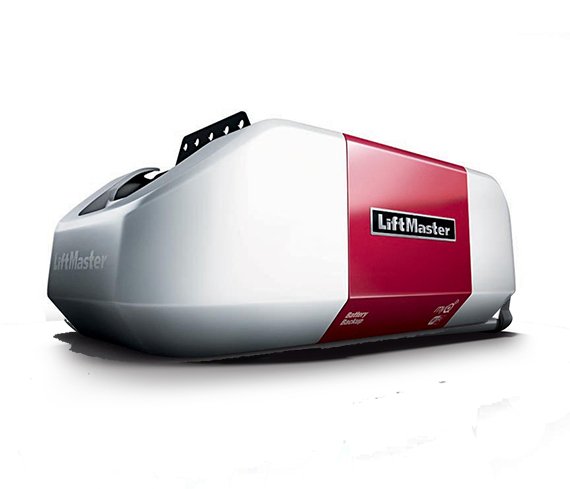
LiftMaster 8550W belt drive Wi-Fi garage door opener
Elite Series Belt Drive Wi-Fi · Battery backup capable (485LM)
View on Amazon →Have a Chamberlain? The Chamberlain B6765/B6765T → is the retail equivalent of the 8550W — same myQ system, same remotes, different branding.
LiftMaster 8550W — Model Overview
The LiftMaster 8550W is a belt-drive Wi-Fi garage door opener built for quiet operation in homes with attached garages. It uses a DC motor (smoother and quieter than AC), Security+ 2.0 rolling code technology, and connects to your home Wi-Fi for remote control through the myQ app. It's one of the most common openers installed in North Alabama homes over the past decade.
| Spec | Detail |
|---|---|
| Models | 8550W · 8550WL · 8550WLB · 8550WLB-267 |
| Drive type | Belt drive — quieter than chain, ideal for attached garages |
| Motor | DC motor with soft start/stop |
| Wi-Fi | 2.4 GHz (802.11 b/g/n) — does NOT support 5 GHz |
| App | myQ (iOS and Android — free download) |
| Security | Security+ 2.0 rolling code — changes code with every use |
| Learn button color | Yellow |
| Battery backup | Yes on WLB models — Model 485LM replacement battery |
| Remote battery | 3V CR2032 coin cell |
| Motor warranty | Lifetime |
| Parts warranty | 5 years |
| Compatible doors | Sectional doors only (NOT one-piece doors for auto-close) |
LiftMaster 8550W Blink Code Chart — Full Diagnostic Guide
When the 8550W detects a problem, the LED indicator near the Learn button flashes in a pattern. Count the UP arrow flashes, then the DOWN arrow flashes. The combination tells you the exact fault.
| UP Blinks | DOWN Blinks | Symptom | Cause | Fix |
|---|---|---|---|---|
| 1 | 1 | Won't close, lights flash | Sensor wires not connected or cut | Check sensor wire connections at motor unit terminals. White to terminal 2, white/black to terminal 3. |
| 1 | 2 | Won't close, lights flash | Sensor wires shorted or polarity reversed | Check wiring — white to white terminal, white/black to grey terminal. Replace shorted wiring. |
| 1 | 3 | Wall control not working | Wall control wires shorted or control faulty | Remove wall control, touch the two wires together — if door operates, replace the wall control or wiring. |
| 1 | 4 | Won't close, lights flash | Sensor beam blocked or sensors misaligned | Align sensors until both LEDs are solid — amber on sender, green on receiver. Clear any obstruction between sensors. |
| 1 | 5 | Motor hums, door won't move | Motor RPM sensor not detecting movement — mechanical jam | Unplug for 5 seconds and restart. Check door balance. If opener hums but won't move, call a technician. |
| 1 | 6 | No movement at all | Motor circuit or logic board failure | Call a trained technician. Do not attempt to repair the logic board yourself. |
| Lights flash 10 times | Door reverses while closing | Sensor beam interrupted during closing cycle | Check amber LED (sender) is solid. Adjust green LED (receiver) sensor alignment. Clear any obstruction. | |
Battery Backup LED Status — 8550W/8550WLB
The WLB models have a backup battery that powers the opener during outages. The LED on the motor unit tells you the battery status.
| LED Color + Behavior | Meaning | What to Do |
|---|---|---|
| Solid green | Battery fully charged | Nothing — normal |
| Flashing green | Battery currently charging | Normal — wait for it to finish |
| Solid orange + beep | Running on battery (power outage) | Check your breaker — power is out |
| Flashing orange + beep | Battery low | Restore AC power to recharge soon |
| Solid red + beep | Battery needs replacement | Replace with Model 485LM |
$25–$40
$6–$10
How to Program the LiftMaster 8550W Remote
The 8550W has a yellow Learn button — Security+ 2.0 technology. Programming takes about 30 seconds.
- Find the yellow LEARN button on the back or side of the motor unit on the ceiling.
- Press and release the LEARN button once. The yellow LED glows for 30 seconds — this is your programming window.
- Within 30 seconds, press and hold the button on your remote until the opener lights flash or you hear two clicks.
- Test the remote. If it doesn't work, repeat from Step 2.
To erase all remotes: press and hold the LEARN button for 6 seconds until the LED goes out. Then reprogram only the remotes you want to keep.
$30–$45
$30–$45
myQ Wi-Fi Setup for the 8550W
The 8550W connects to 2.4 GHz Wi-Fi only — it does not support 5 GHz. If your router broadcasts both bands with the same name, you may need to temporarily separate them or move the opener closer to the router.
- Download the myQ app (iOS or Android) and create a free account.
- On the motor unit, press the yellow LEARN button 3 times rapidly. The opener beeps once and a blue LED blinks — Wi-Fi setup mode is active.
- On your phone, go to Settings → Wi-Fi and connect to the network starting with "MyQ-".
- Open a browser and go to setup.myqdevice.com. Follow the steps and enter your home 2.4 GHz Wi-Fi password when prompted.
- In the myQ app, add your opener using the serial number shown during setup. Write the serial number on this page for future reference.
| Blue LED Behavior | Meaning |
|---|---|
| Off | Wi-Fi not enabled |
| Blinking slowly | In Wi-Fi setup mode (ready to connect) |
| Blinking rapidly | Attempting to connect to your router |
| Solid after blink sequence | Wi-Fi setup complete — opener is online |
If the myQ app loses connection: press and hold the black ADJUSTMENT button for 6 seconds (3 beeps) to clear Wi-Fi settings, then repeat setup. Visit WiFiHelp.LiftMaster.com for additional help.
8550W Maintenance Schedule
Following this schedule extends the life of your opener and keeps the safety systems functioning correctly.
| Task | Frequency | DIY? |
|---|---|---|
| Test safety reversal — place a 2x4 under the door, door must reverse on contact | Monthly | Yes |
| Test door balance — disconnect opener, lift to halfway, door should hold position | Monthly | Yes (test only) |
| Check sensor alignment — both LED lights should be solid, not blinking | Monthly | Yes |
| Lubricate rollers, hinges, springs with white lithium grease | Annually | Yes |
| Test backup battery — unplug opener, verify door operates on battery | Annually | Yes |
| Replace backup battery (485LM) — even if it passes the test | Every 1–2 years | Yes |
| Wipe rail and re-apply white lithium grease to rail surface | Every 2–3 years | Yes |
| Professional spring and cable inspection | Every 2–3 years | No — trained tech |
| Replace remote battery (CR2032) | As needed (range shortens) | Yes |
8550W Replacement Parts Reference
Use only genuine LiftMaster parts. Order from LiftMaster.com or through a local authorized dealer.
| Part | Part Number | Notes |
|---|---|---|
| Backup Battery | 485LM | For WLB models — replace every 1–2 years |
| Remote Battery | CR2032 (3V coin) | Standard — available anywhere |
| Safety Sensor Kit | 041A5034 | Both sensors with 3 ft wire |
| Belt (7-foot door) | 41A5434-11 | Measure door height before ordering |
| Belt (8-foot door) | 41A5434-13 | Most common residential height |
| Belt (10-foot door) | 41A5434-14 | Taller doors |
| Motor with Travel Module | 041D1739-1 | Call LiftMaster before ordering |
| Logic Board | 050DCTWF | Requires technician installation |
| Emergency Release Rope | 2828 | Red handle and rope assembly |
$25–$40
$20–$35
$15–$30
Common 8550W Problems and Quick Fixes
8550W won't open or close — completely unresponsive
Check that the opener is plugged into a working outlet. Test the outlet with another device. Check the breaker. Verify the LOCK feature on the wall panel is not activated — lock mode disables all remotes while the wall button still works. If none of these apply, count the blink codes on the LED (see chart above).
Remote doesn't work but wall button does
Three possibilities: dead remote battery (replace with CR2032), LOCK mode activated on wall panel (hold wall button to toggle), or the remote needs reprogramming. Try reprogramming first — press LEARN, then within 30 seconds press the remote button until lights flash.
Door reverses before fully closing
Either something is in the sensor beam path (clear it and check for solid LEDs on both sensors) or the down travel limit needs adjustment. If the sensors are fine, the door may be out of balance — test by disconnecting the opener and lifting manually to waist height; it should hold position.
myQ app shows door is open when it's closed (or vice versa)
The sensor that detects door position has drifted. In the myQ app, go to Settings → Garage Door → calibrate. If that doesn't work, power cycle the opener and reconnect the app.
Neighbor's remote opens my 8550W
An old remote has been accidentally programmed. Hold the yellow LEARN button for 6 seconds to erase all remotes, then reprogram only your own. Security+ 2.0 rolling codes prevent this with properly configured openers — if it keeps happening, the opener may have reverted to an older programming state.
Need 8550W Service in North Alabama?
For 8550W issues that require a technician — broken springs, failed logic boards, belt replacement, or safety reversal failures — use our contractor directory for same-day service in Huntsville, Madison, Decatur, and Athens.
Open until 10 PM · LiftMaster authorized dealer
24/7 · All North Alabama