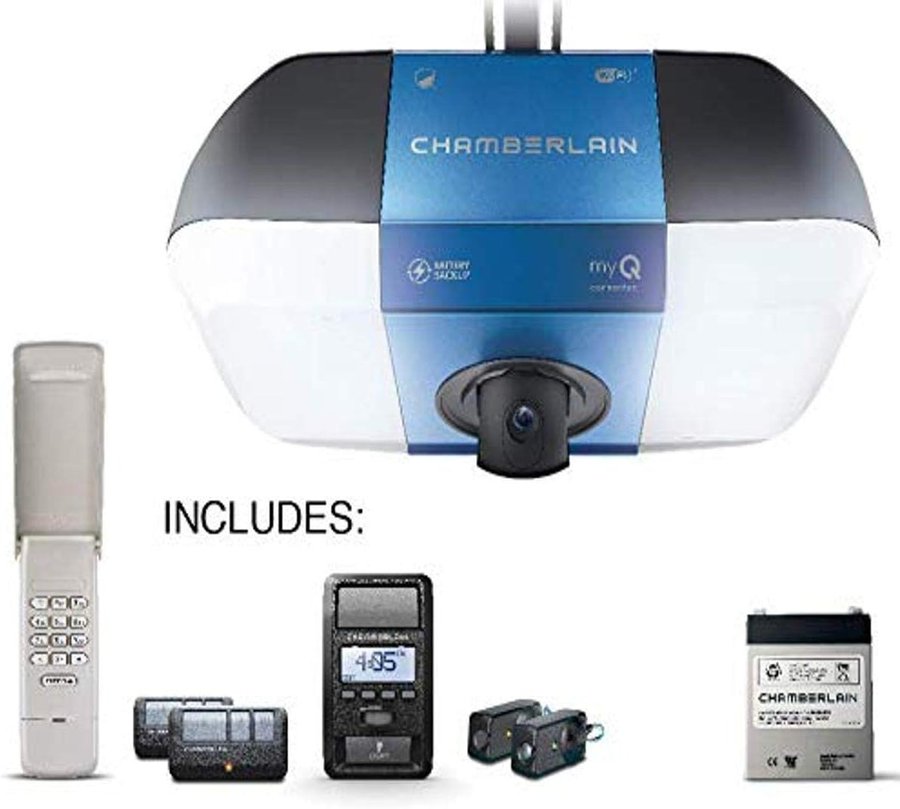
Belt Drive · Built-in HD Camera · Battery Backup · myQ · 1.25 HP · 3,100 Lumens LED
View on Amazon →B6765 vs B6765T — Camera or No Camera
The only difference between these two models is the camera. The B6765T ("T" = camera) includes a built-in motion-activated 1080P HD camera with 2-way audio, night vision, and 360° manual adjustment. The B6765 is the same opener without the camera. Every other spec — motor, belt, battery backup, LED lighting, myQ connectivity, warranty — is identical.
Specs at a Glance
| Spec | B6765 / B6765T |
|---|---|
| Drive type | Steel-reinforced belt drive — ultra-quiet, ideal for attached garages |
| Motor | 1.25 HP DC — more powerful than standard belt drive openers |
| LED lighting | 3,100 lumens — corner-to-corner garage illumination |
| Camera (B6765T) | 1080P HD · Motion-activated · 2-way audio · Night vision · 360° adjustable |
| Battery backup | Yes — standard on both models. Replacement: Chamberlain 4228 / 485LM |
| Wi-Fi | 2.4 GHz (802.11b/g/n) — myQ app — does NOT support 5 GHz |
| Security | Security+ 2.0 only — older Chamberlain remotes NOT compatible |
| Control panel | Smart Control Panel® — screen shows time, temp, battery charge, error codes |
| Amazon Key | Yes — in-garage delivery compatible via myQ app |
| Motor warranty | Lifetime |
| Parts warranty | 5 years (best in class — vs 1 year on most LiftMaster models) |
| Belt warranty | Lifetime |
| LED light pod warranty | 5 years |
| Battery backup warranty | 1 year |
| Camera warranty | 1 year (B6765T only) |
Diagnostic Code Chart (UP/DOWN Blink Codes)
When the B6765 detects a problem, the UP and DOWN arrow LEDs on the opener flash in a repeating pattern. Count the UP flashes, then the DOWN flashes. The Smart Control Panel screen also displays the error code number directly — far easier than watching LEDs.
| UP | DOWN | Symptom | Cause & Fix |
|---|---|---|---|
| 1 | 1 | Won't close, lights flash | Sensor wires not installed, connected, or cut. Inspect wiring from sensor to opener terminal block. |
| 1 | 2 | Won't close, lights flash | Sensor wires shorted or reversed polarity. Inspect at all staple and connection points — replace or correct wiring. |
| 1 | 3 | Door control won't work | Door control wires shorted or control faulty. Touch the two control wires together at the opener — if the door runs, replace the wiring or control. |
| 1 | 4 | Won't close, lights flash | Sensors misaligned or obstructed. Realign until both LEDs are steady. Check for anything hanging on the door interrupting the sensor beam. |
| 1 | 5 | Door coasts past stop position | Reprogram travel limits, or have door balanced by a trained technician. |
| 2 | 1–5 | No movement, no sound | Replace logic board. Call a technician — this is not a DIY repair. |
| 3 | 2 | Cannot set or retain travel position | Check travel module connections. Replace travel module if connections are secure. |
| 3 | 3 | Battery status LED flashing green constantly | Battery backup charging circuit error. Replace logic board. |
| 4 | 1–4 | Door stops or reverses during travel | Manually open and close door — check for binding, obstruction, broken spring, or locked door. Contact a technician if door is binding. |
| 4 | 5 | Runs 6–8 inches then stops and reverses | Travel module communication error. Check module connections, replace if needed. |
| 4 | 6 | Won't close, lights flash | Sensors misaligned or momentarily obstructed. Realign sensors. Check for anything blocking the beam path near the door bottom. |
Battery Backup Guide
Both B6765 models include battery backup as a standard feature. When power is out, the opener runs on battery for up to 20 cycles. The replacement battery is the Chamberlain 4228 (also sold as the LiftMaster 485LM — they are the same physical battery).
| Battery LED / Screen | Meaning | Action |
|---|---|---|
| Green · Solid (or full bars on screen) | Fully charged | Normal |
| Green · Flashing | Charging | Normal — leave plugged in |
| Green · Constant flash (code 3-3) | Charging circuit error | Replace logic board — call technician |
| Orange/Amber · Solid or flashing | Running on battery / battery low | Restore AC power to recharge |
| Red · Flashing or screen battery warning | Battery needs replacement | Order Chamberlain 4228 or LiftMaster 485LM |
~$350–$400
$25–$40
myQ Wi-Fi Setup
The B6765 requires 2.4 GHz Wi-Fi. If your router broadcasts both 2.4 GHz and 5 GHz with the same network name, temporarily connect your phone to 2.4 GHz before setup.
- On the Smart Control Panel, press MENU → SETUP → WI-FI. Or press the LEARN button on the opener unit — the Wi-Fi LED begins blinking blue.
- On your phone, go to Wi-Fi settings and connect to the network starting with "MyQ-".
- Open a browser and go to setup.myqdevice.com. Follow the prompts and enter your home Wi-Fi password. Note the myQ serial number displayed.
- Download the myQ app, create an account, and add the opener using that serial number.
| Wi-Fi LED | Meaning |
|---|---|
| Blue · Off | Wi-Fi not turned on |
| Blue · Blinking | In Wi-Fi learn mode |
| Blue · Solid | Mobile device connected to opener |
| Blue + Green · Blinking | Attempting to connect to router |
| Green · Solid | Wi-Fi set up and connected normally |
Programming Remotes and Keypads
Only Security+ 2.0 accessories are compatible. Older Chamberlain remotes will not work.
Method 1 — Smart Control Panel
- Press MENU on the Smart Control Panel.
- Navigate to PROGRAM using the navigation buttons.
- Select REMOTE or KEYPAD.
- Press the remote button or enter your keypad PIN + ENTER. The opener lights flash to confirm.
Method 2 — LEARN Button on Opener
- Locate the LEARN button on the side or back of the motor unit. Press and release it — the LED glows for 30 seconds.
- Within 30 seconds, press and hold the button on your remote until the opener lights flash or you hear two clicks.
- Test the remote.
To erase all remotes: Press and hold the LEARN button for about 6 seconds until the LED goes out. All remotes, keypads, and HomeLink buttons are erased. To also erase myQ devices, hold LEARN until the LED goes out, then immediately hold LEARN again until it goes out a second time.
$30–$45
$30–$45
Smart Control Panel® — Features Guide
The B6765 ships with the Smart Control Panel (model 880LMW for LiftMaster equivalent). This wall-mounted unit shows more information than a standard wall button.
- Screen: Displays current time, temperature (if sensor connected), and battery charge level at rest. Shows error codes when a fault is detected — eliminating the need to count LED blinks.
- LOCK feature: Disables all remote controls while allowing the door control and keyless entry to still operate. Activate via MENU → LOCK. Useful when away on vacation. The myQ app also provides lockout capability remotely.
- LIGHT button: Manually controls the opener's LED lighting. Lights auto-off after 4.5 minutes by default — adjustable in the menu.
- Motion sensor: Some control panel versions include a motion sensor that turns the lights on when someone enters the garage.
- Timer-to-Close (TTC): Accessible through the menu — sets the opener to automatically close the door after a preset time. Compatible with sectional doors only.
Common B6765 Problems — Fixed
Door won't close, lights flash 10 times
The Protector System sensors are blocked or misaligned. Check that the amber LED (sender) is solid and the green LED (receiver) is solid. If either blinks, realign the sensor by loosening the wing nut, adjusting until the LED goes solid, retightening. Look for anything hanging on the door that might break the sensor beam while closing. The Smart Control Panel screen will also display "Error 1-4" in this case.
Opener runs 6–8 inches then stops and reverses (Code 4-5)
Travel module communication error. Check the travel module cable connection at both ends — the module clips onto the rail. If the cable is secure and the problem persists, the travel module needs replacement. This is a common wear item on DC motor openers after several years of operation.
Door binds or stops mid-travel (Codes 4-1 to 4-4)
Manually disconnect the opener and open/close the door by hand. If the door feels stiff or uneven, the door hardware (springs, cables, rollers, track) needs attention before the opener can operate safely. A door that the opener can't move smoothly is a door that needs a technician, not an opener adjustment.
Remote won't work, wall button does
Check if the LOCK feature is active — the Smart Control Panel screen shows "LOCK ON" when enabled. Go to MENU → LOCK to toggle it off. Also verify remote battery (CR2032) and that you're using a Security+ 2.0 compatible remote.
Battery flashing green constantly (Code 3-3)
Battery backup charging circuit error — this is a logic board fault, not a battery problem. Replacing the battery won't fix it. Call a technician for logic board replacement.
B6765 vs LiftMaster 8550W — Key Differences
| Feature | Chamberlain B6765T | LiftMaster 8550W |
|---|---|---|
| Brand | Chamberlain (retail/consumer) | LiftMaster (dealer/pro) |
| Built-in camera | Yes (B6765T) — 1080P HD | No |
| LED lighting | 3,100 lumens | Standard |
| Motor HP | 1.25 HP | DC (comparable) |
| Parts warranty | 5 years | 5 years |
| Control panel | Smart Control Panel w/ screen | Wall button (no screen) |
| Amazon Key | Yes | Yes |
| Where to buy | Home Depot, Amazon, Costco | Through authorized dealers |
| Price | $350–$400 (B6765T) | $250–$350 |
Maintenance Schedule
| Task | Frequency |
|---|---|
| Safety reversal test — 2x4 flat on floor, door must reverse on contact | Monthly |
| Sensor check — amber solid + green solid on both sensors | Monthly |
| Door balance test — disconnect opener, lift door to waist, release | Monthly |
| Lubricate rollers, hinges, and springs (NOT the belt) | Annually |
| Battery backup test — unplug opener, verify door operates on battery | Annually |
| Replace backup battery (preventative) | Every 1–2 years |
| Professional spring and cable inspection | Every 2–3 years |
Get B6765 Service in North Alabama
Open until 10 PM · Chamberlain dealer
24/7 · All North Alabama